Posts

TFS 2010 - Project Explorer not connected to TFS (Go Online)

Image
Noticed that everything working fine and we were able to connect to TFS in VS, but the solution explorer dint show the project files connected. Solution Just need to bring the solution on-line again. Somehow, it was offline or in disconnected mode.

Unable to connect to TFS Server 2010 - Team Foundation services not available from server

Image
We commonly encounter this problem, that VS is unable to connect to TFSServer 2010. There are many resolutions and reasons for this problem. We encountered this issue due to the following reason. Problem Reason - Our Administrator changed administrator password of administrator. - Application poll start and stops again when it was accessed. - whenever we start the application poll, it automatically stopped whenever someone access it. - This administrator password was in the application poll to run it. When password changed, the service was unable to connect. Resolution Simple resolution is to provide the correct username and password. Try to give administrator passowrd to run things normally. Identify server-name\administrator enter 3 dots and you will see the last screen shot screen Enter correct username and password on this screen This will resolve the problem Hope this will help you Thanks and Regards,

Agile Management - TFS (Priority, Stack Rank and Severity)

As per Microsoft Documentation Source http://msdn.microsoft.com/en-us/library/dd983994.aspx Priority A subjective rating of the bug, issue, task, or test case as it relates to the business. You can specify the following values: 1 :  Product cannot ship without the successful resolution of the work item, and it should be addressed as soon as possible. 2 :  Product cannot ship without the successful resolution of the work item, but it does not need to be addressed immediately. 3 :  Resolution of the work item is optional based on resources, time, and risk. Stack Rank A subjective rating of the user story, task, issue, or bug compared to other work items of the same type. An item that is assigned a lower number should be fixed before an item that is assigned a higher number. (Agile and CMMI process templates) Severity A subjective rating of the impact of a bug on the project. You can specify the following values: 1 - Critical 2 - High ...

InfoPath 2010 Deployment - from Development to Production - Editing Manifest.xsf file

Image
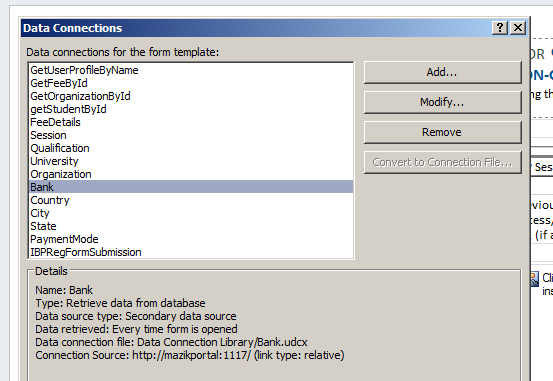
One major issue we encountered in InfoPath 2010 forms during deployment is that the Data Connection's Connection Source cannot be changed easily... we successfully changed the UDCX files and everything but this URL remains unchanged ! See the image below Solution To resolve this issue we need to actually change the manifest.xsf file. Thanks to this link which provides us with the best solution http://sladescross.wordpress.com/2010/03/24/infopath-edit-the-manifest/ Change the extension of infopath form from XSN to CAB. Unzip/Extract the files to any location you like Find manifest.xsf in the directory and open it in Notepad (or some other text editor). Find and replace all instances of existing URL with the new one. Save the modified manifest.xsf. Right-click the modified manifest.xsf, select DESIGN , and finally use File | Save As… to save the form template as a XSN file. (This is the only way to regroup the files back to XSN FORMAT). OPENING FILE in DE...

SharePoint 2010 Deployment - Your backup is from a different version of Microsoft SharePoint Foundation and cannot be restored to a server running the current version

Image
A Nightmare ! ... we constantly get this error when Restoring our Site from Development to Production Environment. We did run the windows update, PSConfig and everything. Finally after searching a lot we identified that the versions of both these Farms are Different. See the attached image to see the difference in versions. To check SharePoint Current Version go to Control Pannel > Program and Features .... and See SharePoint Server 2010 there and check its version next to it. click on the image to enlarge it We finally figured out that the Source SharePoint 2010 Server had 14.0.4763.1000 And Target SharePoint 2010 Server had 14.0.6029.1000 This means that Target should be at the same version. The higher version is creating the problem to Restore... however Microsoft must have provided backward compatibility ! Complete Error Details Restore-SPSite : Your backup is from a different version of Microsoft SharePoint t Foundation and cannot be restored to a server runnin...

Blogger - Image display changed - New Improvements to Image Display in LightBox

Image
Dear All, I really hate the new feature of blogger to display images in a lightbox ! ... becuase I use to upload images in full sizes and wants my visitors to see full size and high quality pictures. However, the new feature allows the users to see images in a lightbox as follows To resolve this issue please check this link http://www.google.com/support/forum/p/blogger/thread?tid=73493b0be3a4116d&hl=en The only thing you need to do is to go in Settings › Posts and comments and Change Showcase images with Lightbox to NO

InfoPath 2010 - Date Picker problem when SetVal from CodeBehind

Recently we came across a problem in InfoPath 2010 DateTime Control. When we assign a value in code-behind, the text box is marked red and asking for a valid date. However the date was valid and when we type the same date, it accept the same date. The assignment was as follows in code behind which produces the error MainDataSource.CreateNavigator().SelectSingleNode( "/my:myFields/my:grpFeeDetails/my:dateDPO" , NamespaceManager).SetValue(l_oDateTimeDateDPO.ToShortDateString()); Identified Problem Basically the issue is with the format of the date. When we use ToShortDateString, then the format is not compatible with the InfoPath 2010 Date Format. Resolution To resolve this issue we used the following code MainDataSource.CreateNavigator().SelectSingleNode( "/my:myFields/my:txtDOB" , NamespaceManager).SetValue(l_oDateTimeDOB.ToString( "yyyy-MM-dd" )); The Important Point is this DateTime Format l_oDateTimeDOB.ToString("yyyy-MM-dd") ...