Posts

CSS and Javascript not loading in Asp.Net WebSite and WebApplication

Image
Today we came across a very strange and unique issue. The Asp.Net WebApplication has everything perfect and virtual directory and other configrations is perfect, but when we run the application, CSS and Javascript files were not included. The refrences and inlcude scripts were perfect and we cross checked everything. But in vain. Finally, we found the following solution from this Blog http://weblogs.asp.net/anasghanem/archive/2008/05/23/don-t-forget-to-check-quot-static-content-service-quot-in-iis7-installation.aspx?CommentPosted=true#commentmessage The contents of this Blog are as follows Don't forget to check "Static content service" in IIS7 installation Before a couple of days ,I started to work on Vista and IIS 7, and since the default installation for Vista doesn't includes IIS7, I started by trying to install IIS 7.So I went to control panel, Programs and features, then to " turns windows features on or off", After the dialog displayed , I nav...
Direct Streaming from SKYDrive

Image
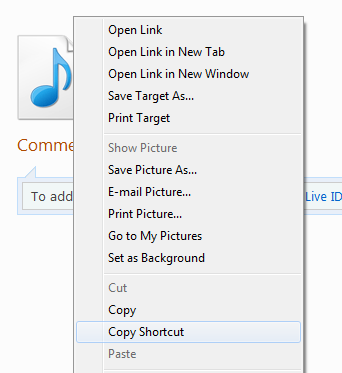
Just wanted to share the information that you can easily play any mp3 or audio collections directly from SKYDrive. Follow these steps • Try to reach to the file you want to listen. For e.g. (This is my latest upload) http://cid-0fce01d6e47c7156.office.live.com/self.aspx/Maulana%20Tariq%20Jameel/Latest%20Bayaans/Volume%2086%20%5E5October%202010%5E6/Namaz%20aur%20Maut%20-%20Gilliana%20-%202010/Namaz%20aur%20Maut%20-%20Gilliana%20-%202010-Part%202.mp3 • Now right click the icon and click COPY SHORTCUT. Please note that in Other Browsers Copy Shortcut is named differently (i.e. in Chrome its known as COPY Link Address) IE Explorer Screenshot Google Chrome Screenshot • Open your media player. Press Ctrl + U and paste the URL. The file will be played directly without downloading. Or you can open any other software like Real Player and Open URL. Paste the copied URL to play the file. • Additionally you can use this direct link to embed these audio anywhere on the net. Th...

.Net - Value Type and Reference Type

Summary of the Article Always pass Reference Type ByVAL and not ByRef. Why ? Read it One of the most common mistakes developers make when learning .NET is confusing Reference and Value Types with Passing values by Reference or Value. Is this a big deal?  YES!  It's a very big deal. So let's go through the basics first: Values types break down like this... (From MSDN) Value types include:      All numeric data types      Boolean, Char, and Date      All structures, even if their members are reference types      Enumerations, since their underlying type is always Byte, Short, Integer, or Long Reference types include:      String      All arrays, even if their elements are value types      Class types, such as Form      Delegates So, when you pass arguments to a subroutine or function, you...

Session Management Asp.Net

Please do comment if you find this infromation contradictory. We should always have a centralized location to manage all the session variables in our application. This way, it is really very easy for all the programmers working on the application to get to know about Session Information. This session information can be reused whereever needed. It's not a problem to store "objects" (as opposed to value-types like int) into Session. You could even say it's better to store objects than value-types, because those value-types need "boxing" and "unboxing". To achieve this purpose, we have used hashtables to be saved in a session. Every module can have its own hashtable to group all the common session information. The key/value pair of the hash can be exposed through public properties. For instance, below is the complete code of Session Management Class for only one variable in a hashtable. Sample VB.Net Code 1: Public Shared Property NHPActive...

The virtual path maps to another application, which is not allowed

Image
During the development we came across this issue, which wasted a lot of our precious time. So I decided to share its solution with everyone. We have Project and Sub-Project Structure i.e. we have a root project and several sub-projects. The ROOT Project is entitled as TEMS8 and all other subprojects have been configured as per the image below. (Click on the image for large size) Now after setting up everything on a new Machine, we came across the Error as The virtual path maps to another application, which is not allowed Finally after investigation, we figured out that we have created multiple virtual directories which mainly causes the issue. For instance, we have another virtual directory created for DATADEF which is inside the virtual directory of TEMS8. So this was the main issue. The resolution was to remove the DATADEF Virtual Directory. Everything worked out perfectly, once we removed the inner virtual directory. We should not have something like this image below  W...

Silverlight 4 - Getting Started in ASP.Net

The new technology - Silverlight ! All the forums and websites full of its importance and usage. We are still in the phase of decision as to how to integrate Silverlight in our exisiting ASP.Net Application. With confused mind, we are unable to make any profound decision. Did some postings on the web also, to acquire the ideas of exprienced people to get to know the solution. One idea is to completley transform the exisiting application to SL, which is out of the question. Second idea is to find out the areas which we can replace with the SL Controls. We are still working on that. The main area would be to write a communication layer between the Asp.Net Current Application and the new Silverlight Application. WCF is the preferred way ! Will update on this blog about the work. Do comment, what do you think about SL and integration of it in Asp.Net